
Power Apps Now Lives Inside Microsoft 365 Copilot Conversations
Microsoft has introduced a new public preview that brings Power Apps directly into Microsoft 365 Copilot, making business applications part of everyday conversations. Users can now interact with app data, view records, and take actions without leaving their workflow across tools like Word, Excel, and PowerPoint. This update marks a shift toward more conversational, AI-driven experiences, enabling organizations to surface and act on business data seamlessly within the flow of work.
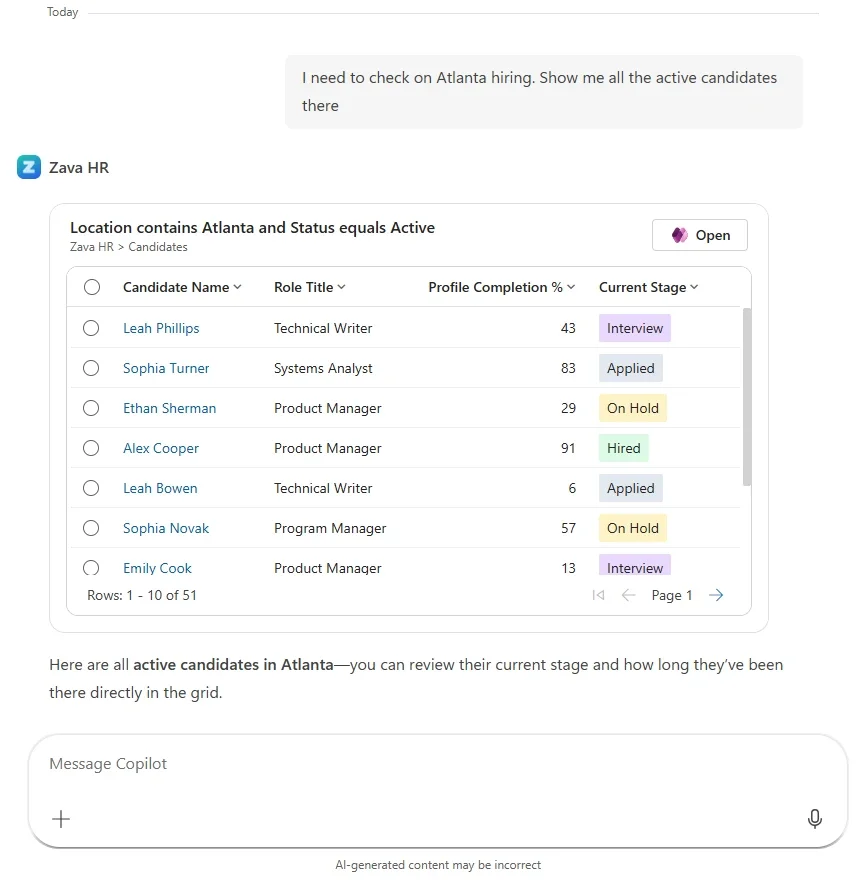
Here are its capabilities:
Explore data with grids—without leaving the conversation
Ask Copilot questions like “Show me open accounts in the West region” or “Which cases were escalated this week?” and get interactive, filterable results instantly. Drill into records, make edits, and continue the conversation—all in one place.
Create and update records with forms
No more jumping between apps. Create, view, and update records directly in Copilot, with intelligent field suggestions that reduce manual input and speed up data entry.
Work across Microsoft 365 apps
Whether you're in Word, Excel, or PowerPoint, you can access and act on your business data alongside your work. No copy-pasting. No lost context—just seamless productivity.
Custom tools (coming soon)
Extend beyond grids and forms by building tailored tools that fit your unique business scenarios—bringing even more power into Copilot.
Get started today
Enable your app’s MCP server in Power Apps, deploy to Microsoft 365 or Teams, and start interacting with your business data through Copilot—instantly.
Give your team an AI chat that truly understands your organisation’s systems. Discover System Knowledge Assistant—get in touch today!
